
A radial water-ripple displacement effect for Resolume Arena. Fire an expanding ripple that warps your video as it travels — across a clip, a layer, or the whole composition.
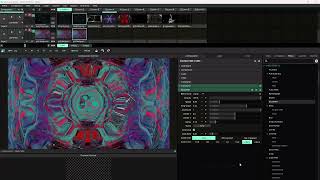
BLOOPER adds an expanding water-ripple distortion to any video in Resolume Arena. Hit the Bump button — or trigger it from a MIDI controller, clip, or automation — and a ripple radiates outward from the center of the frame, warping the underlying video as it travels. Stack multiple ripples, let them pulse automatically, or lock them to your music's BPM.
Ripples are true circles on any canvas — 16:9, vertical, or square — so they never come out stretched or egg-shaped regardless of your composition resolution. Drop it on a clip, a layer, or the whole composition and shape the result with a handful of intuitive controls.
One button sends a ripple radiating across your video. Map it to MIDI or automation and fire it live on the beat.
Fire ripples rapidly and up to 16 travel at once. Where they overlap they reinforce — perfect for hits and drops.
Lock ripple speed and cadence to your track. BPM-synced and Bar-triggered modes keep everything perfectly in time.
Turn on Auto Loop for hands-free, steady pulsing — no clicking required. Dial in the rate to taste.
Ripples stay perfectly round on 16:9, vertical, or square comps — never stretched or egg-shaped.
Drop BLOOPER onto a single clip, an entire layer, or the whole composition. Shape it with Speed, Ring Width, Amplitude, Center, and Decay.
BLOOPER ships as a single Windows plugin (BLOOPER.dll) inside a zip with its readme and license. Installing it takes about a minute:
Grab the zip from the download page and extract it anywhere. Inside you'll find BLOOPER.dll, a readme, and the license.
Copy BLOOPER.dll into your Resolume Extra Effects folder — usually Documents\Resolume Arena\Extra Effects\. Create the folder if it doesn't exist.
Fully quit and relaunch Resolume — it only scans for plugins on startup. BLOOPER then appears in your Effects panel.
Drag BLOOPER onto any clip, layer, or composition and click Bump to fire your first ripple. Full setup is in the readme inside the zip.
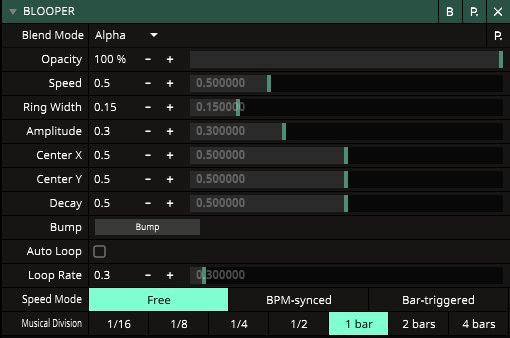
How fast the ripple travels from center to edge. (In synced modes, speed is set by BPM and Musical Division instead.)
Thickness of the ripple band. Thin = sharp, defined ring; wide = soft, broad swell.
How strongly the ripple distorts the video. Low = subtle shimmer; high = dramatic warping.
Where the ripple originates. 0.5 / 0.5 is frame center — move them to fire from a corner or edge.
How quickly the ripple fades as it expands. High decay dies out early; low decay travels the full frame.
The trigger. Click or map it to MIDI/automation to fire a single ripple. Fire rapidly to stack ripples.
Spawn ripples automatically at a steady rate — from one every 10 seconds up to several per second.
Free (manual), BPM-synced (locks to composition BPM), or Bar-triggered (fires on the downbeat of each bar).
In synced modes, set which note value ripples lock to: 1/16, 1/8, 1/4, 1/2, 1 bar, 2 bars, or 4 bars.